
The recruiting coordinator system
As a Recruiting Coordinator at Amazon, I scheduled about thirty interview loops at a time, five interviewers each, every one on its own deadline. This is the Asana tracker I built to run them, the rules that kept it moving, and the browser extensions I wrote to add what Asana didn't have.
 Maria Laura, Recruiting Coordinator, who trained me at Amazon · from her LinkedIn recommendation
The system
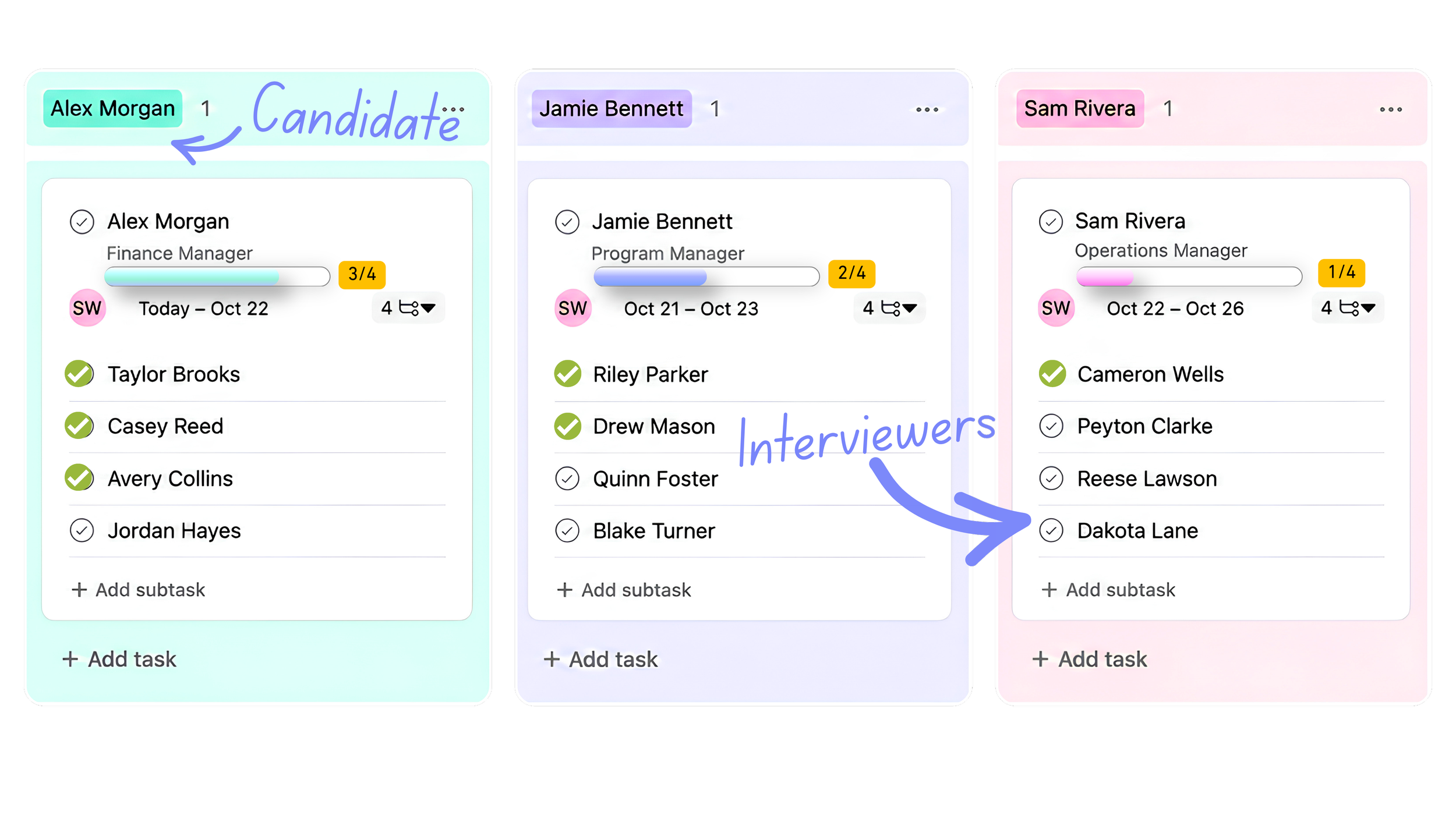
One task per candidate
The task's fields were that candidate's state. Changing the status was the only thing I did by hand.
One checkbox per interviewer
I ticked it as part of doing the job, so it was never out of date. The progress bar, countdown and emails all read from it.
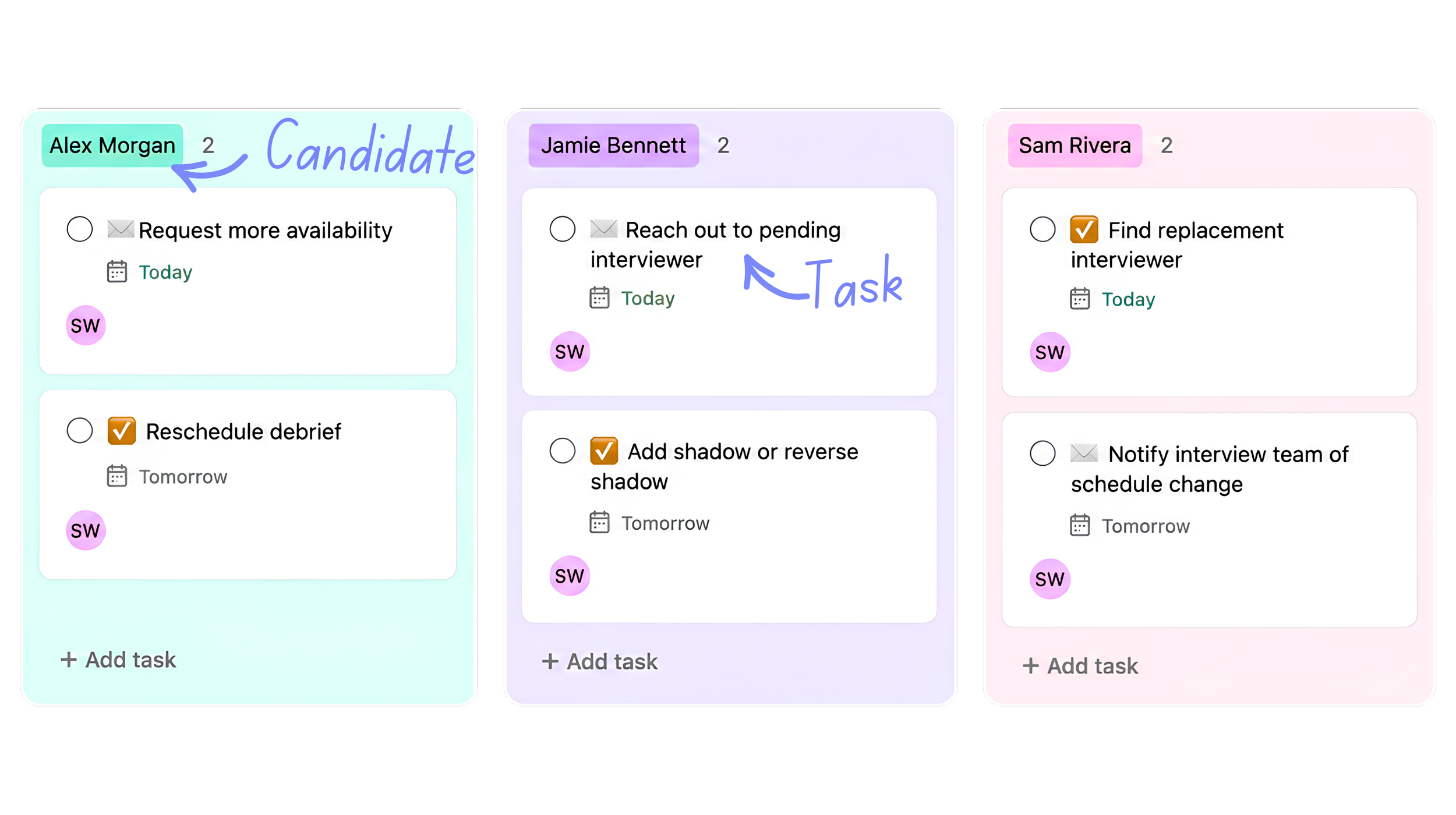
Follow-up work is its own task
"Find a replacement" pointed back at the candidate, so it could be counted, assigned and closed like anything else.
 Maria Laura, Recruiting Coordinator, who trained me at Amazon
The pipeline
Nine stages, each with its own section. Blocked and Tasks sat beside the pipeline.
The automations
I changed the status
Changing a status was how I told the system what happened. The rules stamped the date, ticked the milestone, moved the section and set the progress bar.
A to-do appeared
Thirteen rules created the next piece of work the moment a loop needed it, already linked to the candidate. I controlled when the workflow moved forward; the automations handled the repeatable steps.
Two states set themselves
All clear turned on once everyone had confirmed. Live turned on the day the interviews started.
| I set the status to | The rules did |
|---|---|
| Intake sent | Stamp the date, tick the milestone, move to Intake Sent, progress 17% |
| Dates received | Stamp the date, move to Needs Scheduling, progress 33% |
| Scheduled | Stamp the date; the interview dates become the task's due date |
| Save the date sent | Stamp the date, move to STD Sent, progress 83% |
| Confirmation sent | Stamp the date, move to Confirmed, progress 100% |
| Complete, canceled, withdrew | Stamp the completion date and move the loop off the active list |
| What happened | Task that appeared |
|---|---|
| An interviewer declines | Find a replacement, or reach out to reschedule |
| An interviewer hasn't answered | Reach out to the pending interviewer |
| A confirmation went out with someone still pending | Send the follow-up confirmation once they accept |
| The candidate's dates don't work | Request more availability |
| The schedule changes | Notify the interview team; create the team Slack thread |
| The debrief needs changing | Reschedule the debrief; add or remove attendees |
| The loop needs extra people | Add a shadow interviewer, or a Bar Raiser in training |
The browser extensions
Why extensions
Asana couldn't be connected to anything from outside. So each tool was a small script in my own browser that read what was on screen and added what was missing.
Try them
Everything below is clickable: press the buttons, switch the emails, filter the table. Sample data, fictional names.
RC Tools
A countdown
Work days to the first interview, colored by how close it was.
A progress bar
Read straight from the interviewer checkboxes.
Two add-task buttons
To-do and Contact. Six clicks became one: pick a preset or type anything, and the task was created with the status and candidate set.
The tracker list with RC Tools on it. Press ✅ or 📧 on any row and the popup below opens for that candidate, the same way it did in Asana. Sample candidates, fictional names.
Press To-do or Contact, pick a preset or type your own, then Add.
The countdown pills, in work days to the first interview.
Email and Slack builder
 Trey, Recruiting Coordinator
Read the page
Schedule, interviewers, recruiter, the candidate's time zone. Nothing retyped.
Thirteen templates
One master document of approved wording. The draft opened in Outlook with the right people copied.
2½ minutes became 20 seconds
Preparing a final confirmation dropped from 2½ to 3 minutes to about 20 seconds. No copy while a blank was empty; times converted to the candidate's zone.
Switch emails, change the time zone, click an interview to change its status. The preview is cut short here; the real one was the whole email.
Outlook sync
Ticked the checkbox for me
Read the "accepted" and "declined" replies and updated the interviewer on the candidate's task, after showing me what it was about to change.
Showed what was sent
Read my Sent folder and showed which emails each candidate had received, plus what was due or owed.
Alex Morgan
Alex Morgan
Alex Morgan
Alex Morgan
The sync panel on each side. Outlook reads the folder; Asana shows what it would change and does nothing until I switch off the dry run and press Apply.
Outlook read the folder; Asana showed what it would change and did nothing until the dry run was off. Receipts sat beside each candidate.
Bar Raiser Scores
The hardest seat to fill
Every loop needed a Bar Raiser, a senior interviewer from outside the hiring team. The invite log existed; nobody was reading it.
So I asked the likely yes first
One line per Bar Raiser: how often they said yes, how fast they answered, and a tag. Joined to a directory of 123.
| Alias | Name | TZ | Title | City | Score | Asks | Replies | Tag |
|---|
Results
Used daily
From September 2026, on a work account, while running the loops it tracked.
Human in the loop
Nothing sent or updated without me pressing a button.
Shared with the team, still in use
I presented the tracker to other RCs and taught them to build their own automations. My manager shared it with hundreds of RCs, and the team is still using it after I left. The email tool was written up for leadership to pilot.